


• Printed in Canada
  • Proofs for custom orders
Sticker Canada
  • Printed and cut in Canada
  • You approve the exact sheets before you order
  • Prices shown in your currency
  • Shipping details shown at checkout

Label My Setup

Your setup, labelled like a pro's.

Every device, both ends of every cable and every port — plus the pieces to build your setup on a board you print. All from one list, in your names and your style.

Build my kit

We read your words into a suggested gear list. You accept it, check it and edit it. Nothing goes into your cart until you approve your proof.

What are you labelling?

Kits Checking local price… — your exact total shows with your drawn kit. Returns & reprints

Your kit, drawn live

You name it. We print it perfectly.

List your gear once. We print a matching label for the front of every device and both ends of every cable, plus pieces for a build board that shows how it all connects. Back tags and router port labels are options: they start switched on, and you can turn either off in step 3.

1. What’s on your desk?

Pick a starting point, then add, remove or rename anything.

Your labels

Drawing…

Changes as you edit. Tap it to see it full size.

Snap a photo of your deskComing soon

Or start from

Your gear (5)

  • Cable or Wi-Fi is our best guess — tap to change it

  • Cable or Wi-Fi is our best guess — tap to change it

Add more

Your router

Count the free network sockets on the back. Most home routers have 4.

Free sockets4
Spare cable tags0

What you see is drawn from your list — the same drawing we print from. Nothing prints until you approve it.

  • You pick the names, the rooms, the type style and the colour — and give your kit a name.
  • The counting is done for you: every cable, every port and every sheet, worked out from your list.
  • Your build board carries your kit's name, drawn from the same list as your labels, at true size.

Why it's worth it

Know which cable is which — without pulling the bundle out

Behind most desks every cable looks the same. Unplug the wrong one and you're tracing it by hand, end to end.

With both ends numbered and colour-matched, every port marked and a board that matches, the cable in your hand tells you where it goes — and the setup looks as finished as it works.

Estimate for your exact kit, compared with making the same labels one at a time yourself.

Pick your kit

Three kit sizes. Your list picks the one that fits.

The studio counts the pieces and sheets your list needs and uses the smallest kit that holds them. Every kit has your device labels, both cable ends, port markers, board decals with spares and your build board PDFs.

  • Starter

    Checking local price…

    About 4 devices

    • Up to 32 pieces on 1 sheet

    Example: 4 devices and 0 cables make 25 pieces on 1 sheet.

  • Fits a full desk

    Desk

    Checking local price…

    About 11 devices

    • Up to 110 pieces on up to 3 sheets

    Example: 11 devices and 0 cables make 83 pieces on 2 sheets.

  • Whole Home

    Checking local price…

    About 25 devices

    • Up to 240 pieces on up to 6 sheets

    Example: 25 devices and 0 cables make 189 pieces on 4 sheets.

Bigger setup? Homelab: up to 600 pieces on up to 14 sheets, about 66 devices — Checking local price….

Checking local price…

Made for you, so it's final sale. If your kit arrives with a print defect — wrong colours, damaged material or a misaligned cut — email a photo within 7 days of delivery and we reprint and reship it at no cost. Returns & reprints

What you get

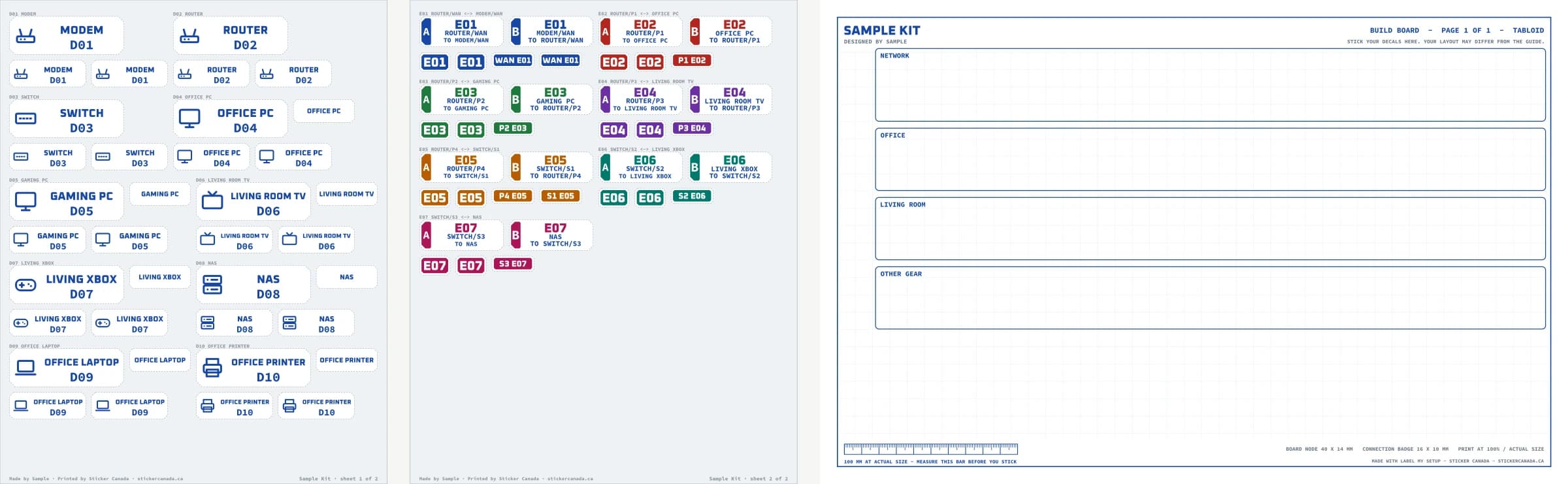
  • The whole sample kit: 2 label sheets with 74 pieces, and the blank build board you print

    Everything in one sample kit: 2 sheets, 74 pieces, and the blank board. Synthetic example, not your proof.

  • Cable E02: the label for each end (A and B), its board connection and the spare board connection, all with the same number and colour

    One cable, four pieces: end A, end B, the board connection and a spare. Same number on all four.

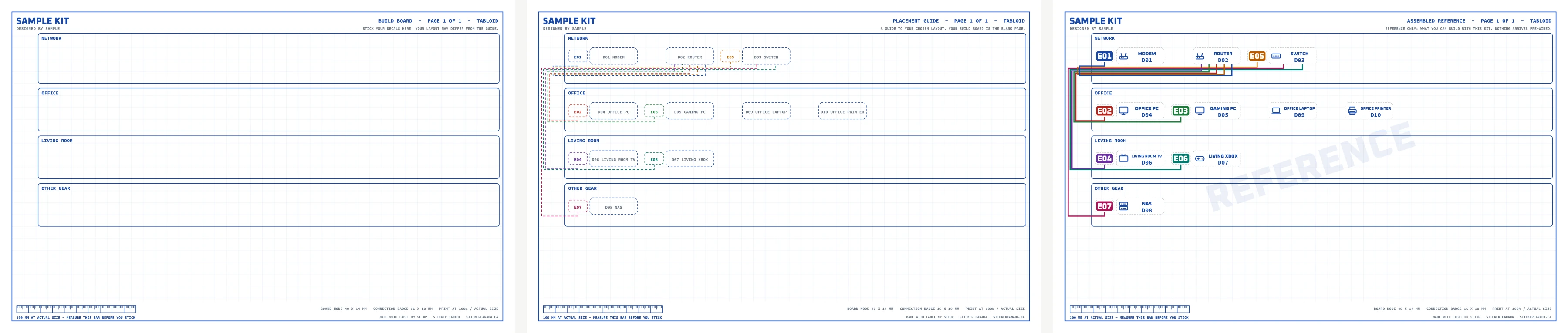
  • Three pages: the blank build board you stick decals on, a placement guide for the sample layout, and a reference picture of the finished board

    Blank board, placement guide, and a reference of what you can build. The board arrives blank; your layout can differ.

  • Close-up at true proportions: a 60 x 20 mm device front, its 40 x 14 mm board node, a back tag and a cable end

    Real type, real sizes: device front 60 x 20 mm, board node 40 x 14 mm, back tag 32 x 12 mm, cable end 44 x 16 mm.

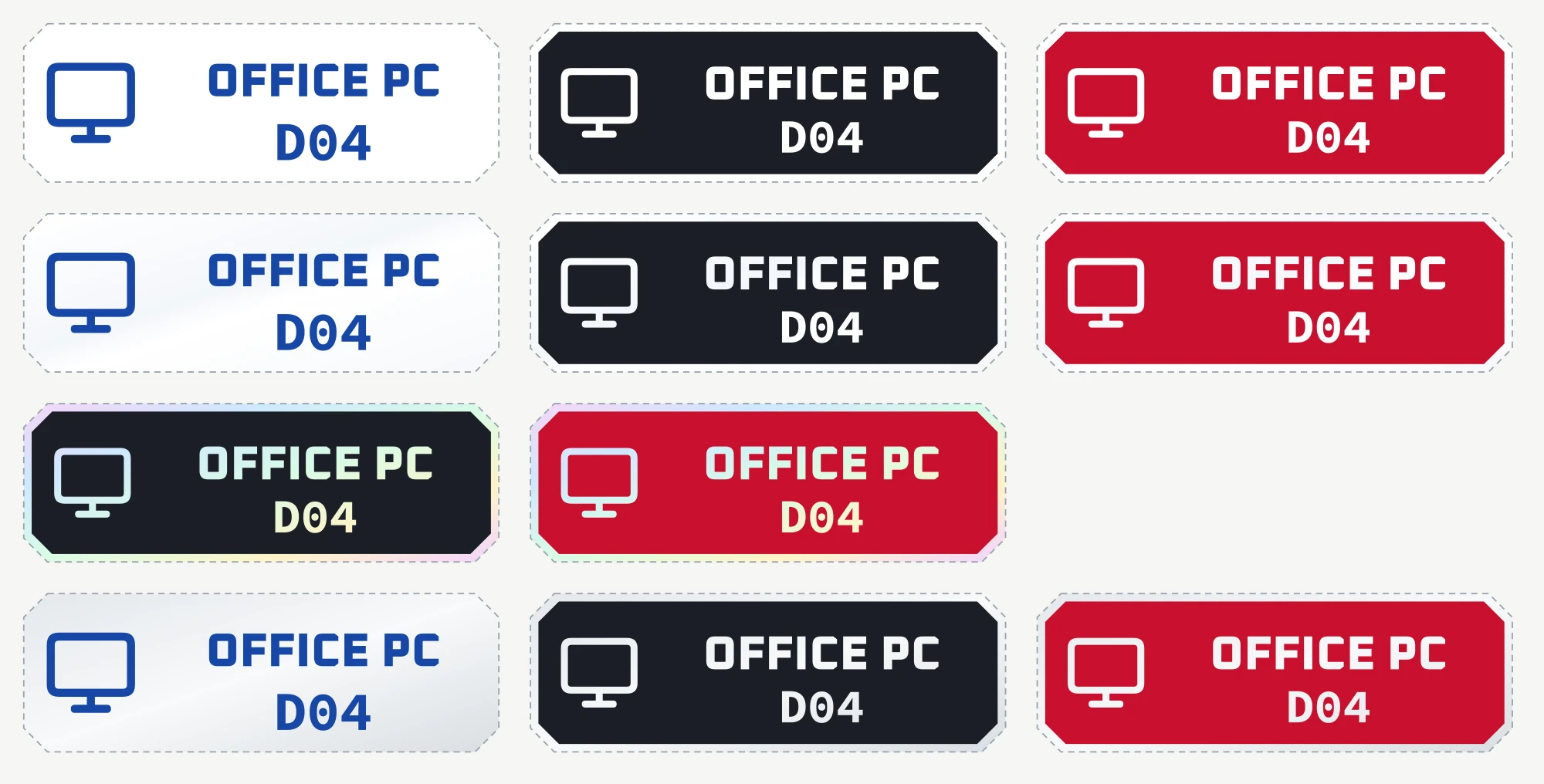
  • The same device label on matte white, gloss white, holographic and reflective stock in each offered look

    Rows: matte white, gloss white, holographic, reflective. Gloss, holographic and reflective are shown as on-screen simulations. Nothing is printed white: white letters are the bare stock.

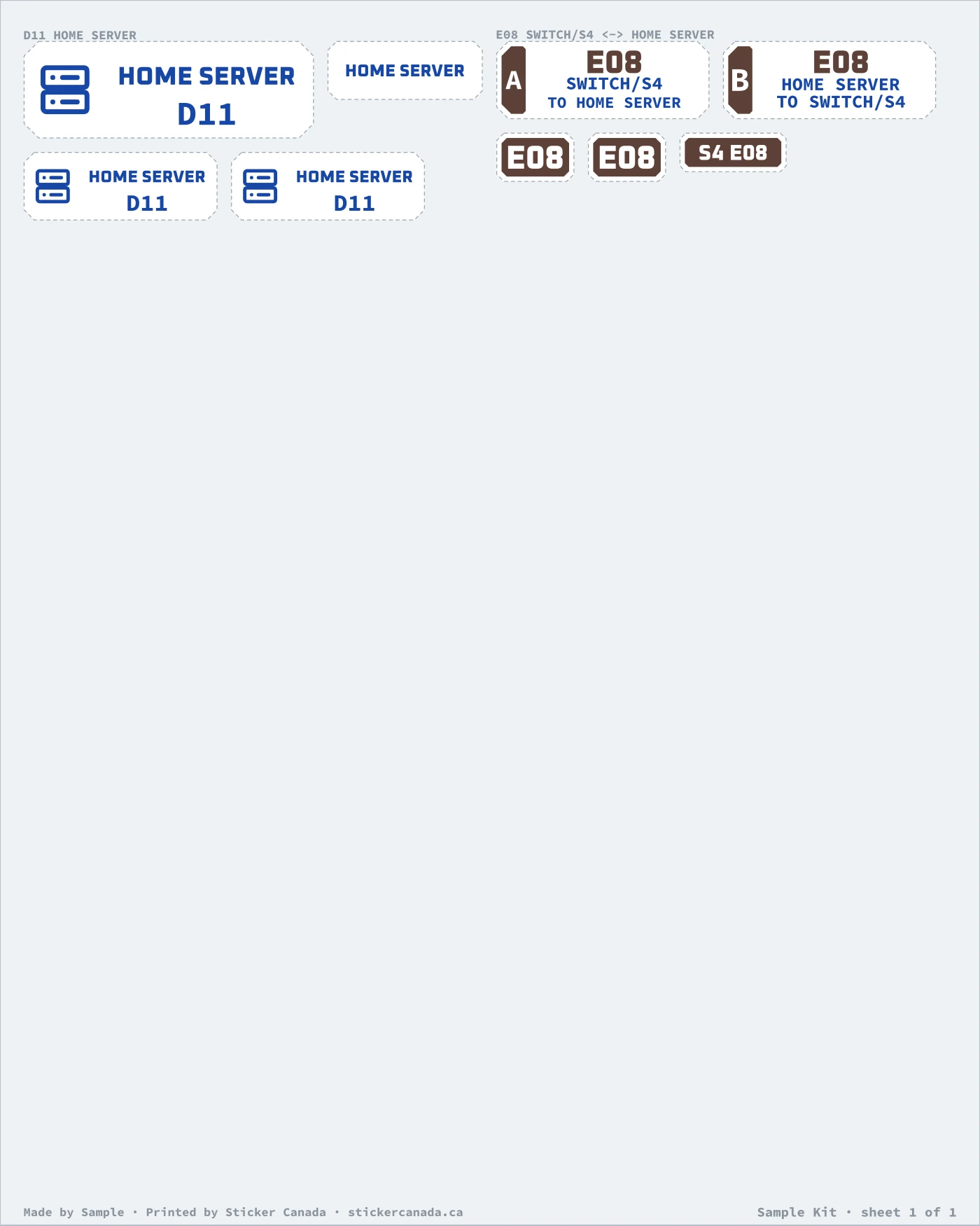
  • An add-on sheet for a grown setup: 9 new or changed pieces, keeping every existing number

    Add gear later: only the new and changed pieces print, and every existing number stays the same.

Where each label goes

One number for every cable, everywhere

Front label60 × 20 mmA flat spot on the front of each device, clear of vents and buttons.
Back tag (optional)32 × 12 mmThe back panel or the power brick, so the plug end matches the box.
Cable end A and B44 × 16 mmBoth ends of every confirmed cable, each saying where it is and where the other end goes.
Port markers22 × 8 mmAbove each router or switch port in use, with the port and cable number.
Board node and badge40 × 14 mm · 16 × 10 mmOn the build board you print: a node per device and a badge per cable, each with a spare.

Step by step, with the numbering system: How do you label network cables at home?

Add a device later. Keep it matching.

New console, new NAS? Your saved kit keeps every device and cable number, so the new pieces match and nothing gets renumbered. Or make one matching label in the same type style and look.

Make one matching label

Product details

Label My Setup turns one list of your gear into a matching kit of printed, cut pieces: a front label for every device, both ends of every network cable (end A and end B, numbered and colour-matched), a marker for each router and switch port, and decals for a build board you print at home — a node for every device and a connection badge for every cable, each with one spare. You check and approve the exact sheets before you order.

What's in the kit
  • A front label for every device, router, switch and modem: icon, name and device number (D01…), 60 × 20 mm, or 100 × 25 mm for a long name.
  • An optional back tag, 32 × 12 mm, for the back panel or the power brick.
  • For every confirmed network cable: cable end A and cable end B (44 × 16 mm, each says where it is and where the other end goes), a board connection badge (16 × 10 mm) and one spare badge. All four share the cable number and colour.
  • For every device: a board node (40 × 14 mm) and one spare node.
  • A port marker (22 × 8 mm) for each router and switch port in use.
  • Optional extras you choose: room tokens, progress ticks and route strips.
  • Your build board, placement guide and connection schedule as PDFs to print at 100% (a printed board is an option when it fits one letter page).

The pieces come on 8 × 10 in peel-off sheets, as many as your list needs. Not included: pens, cables, switches, boards, mounts or sleeves.

How it works
  1. List your gear — one line per device, like office pc wired or printer wifi.
  2. Pick your look — type style, label style and colour.
  3. Check and approve — the sheets and your board are drawn from your list while you watch. You approve one exact version, and that version is what we print.

If your router runs out of ports, the plan suggests a switch and labels its ports too; you confirm you have it (we do not supply it). Anything we had to assume is listed for you to check.

Where the labels go

Put device labels on a clean, smooth, flat outside surface. Keep them clear of vents, ports, lights, buttons, screws and the maker's own markings. Measure the spot first: a front label needs a flat area at least 60 × 20 mm.

Cable-end labels are flat 44 × 16 mm labels for the plug end or a flat spot near it. They are not a wrap-around cable sleeve. Board nodes and badges go on the build board you print, in your own arrangement.

What it doesn't do
  • It doesn't include cables, a switch, a board, a pen or any other hardware.
  • It doesn't scan, test or change your network, and it can't see your board: it shows only what your list says.
  • It doesn't install anything. You stick the pieces where you want them; your board may differ from the guide.
Kit sizes
  • Starter: up to 32 pieces on up to 1 sheets, each 8 × 10 in. Your exact approved configuration determines the pieces included.
  • Desk: up to 110 pieces on up to 3 sheets, each 8 × 10 in. Your exact approved configuration determines the pieces included.
  • Whole Home: up to 240 pieces on up to 6 sheets, each 8 × 10 in. Your exact approved configuration determines the pieces included.
  • Homelab: up to 600 pieces on up to 14 sheets, each 8 × 10 in. Your exact approved configuration determines the pieces included.
Materials

Matte white vinyl and gloss white vinyl in all looks; holographic vinyl in dark and colour looks; reflective film in all looks.

Specifications & verified answers

Before you order

Made for
gamers, home offices, homelab builders, whole-home networks
How ordering works
Preview your design, See the exact price, Approve your preview
Artwork check
Approve your layout preview before checkout. Every order is then reviewed before production — flagged artwork gets a human review, and nothing prints until that review is done.

Label My Setup turns one list of your gear into a matching kit of printed, cut pieces: a front label for every device, both ends of every network cable (end A and end B, numbered and colour-matched), a marker for each router and switch port, and decals for a build board you print at home — a node for every device and a connection badge for every cable, each with one spare. You check and approve the exact sheets before you order.

What you are getting
Device front label60 × 20 mm (or 100 × 25 mm for a long name): icon, name and device number
Back / adapter tag32 × 12 mm, name (optional, per device)
Cable end A and B44 × 16 mm each, cable number, colour, this end and the other end
Board connection badge16 × 10 mm, cable number and colour, plus one spare per cable
Board node40 × 14 mm, icon, name and device number, plus one spare per device
Port marker22 × 8 mm, port and cable number
Sheet8 × 10 in peel-off sheets, as many as the kit needs
Build boardLetter or tabloid PDF to print at 100%, with a 100 mm calibration ruler; placement guide and schedule included; printed board optional when it fits one letter page
LooksColoured words on the bare material · a printed dark or colour field with the letters left unprinted
Devices per kitUp to 60
ProofDrawn live from your list; you approve one exact version before you order
SizeStarter, Desk, Whole Home, HomelabCurrent product variants; available combinations depend on the selected variant
MaterialMatte white vinyl, Gloss white vinyl, Holographic vinyl, Reflective filmCurrent product variants; available combinations depend on the selected variant

What buyers ask

Do I need to know how my network is wired?
No. List your devices in plain words. Where you don't say cable or Wi-Fi, the kit suggests one. A suggested cable gets no cable labels until you confirm it, so nothing is printed for a cable you don't have.
How many labels will I get?
It depends on your list: 4 pieces per confirmed cable (end A, end B, a board badge and a spare badge), 3 per device (front label, board node and a spare node), plus the back tags, port markers and extras you choose. The exact count and the price are shown with the drawing before you order.
What happens if my router runs out of ports?
The plan suggests a switch with one uplink cable back to the router and labels the switch and its ports once you confirm you have it. The switch itself is not included — the kit only labels it.
Can I order just one label?
Yes. Choose "Just one label", type the name, pick an icon, a size and a look, and the preview is the label we print.
What is the build board?
A page you print at 100% (letter or tabloid) with your kit's name, an area for each room and a ruler to check the scale. You stick the board nodes and connection badges on it in any arrangement you like. The placement guide shows the layout you chose, and the assembled reference shows an example of a finished board; nothing arrives pre-wired.
Is anything printed in white?
No. The printer has no white ink. On a white label the white letters are the bare white vinyl; on holographic or reflective film the letters show the film itself. Clear vinyl is not offered for this kit yet.
Are cables or hardware included?
No. The kit is the printed pieces and the board PDFs. Cables, switches, pens, boards, mounts and installation are not included.
Where should I put the labels?
On a clean, smooth, flat outside surface, clear of vents, ports, lights, buttons and screws. Measure the spot first — a front label needs at least 60 × 20 mm of flat space.

Last verified 2026-10-19 against the label sheet and map we print for this kit.

Keep going

More on labelling your setup

Made by you · Printed by Sticker Canada · stickercanada.ca